~UI Automationで画面情報取得!その6~ UI Automation with PowerShell 奮戦記 16日目
UI Automation*1で遊ぼう!
UI Automation の画面情報の取得機能を使用したWindows設定書生成の自動化に挑戦しています。Windowsの標準実装のみ、PowerShellのみで動作させることを目指しています。
UI Automationでの画面操作の捕捉をPowerShellで出来るようにEventタイプを.Net Framworkで実装しました。
実装した開発ライブラリ、共通で使用するスクリプトについては以下を確認してくださいね。
https://amon52280sub.hateblo.jp/entry/2019/01/23/032420
画面情報を取得してみましょう。
制御値を追加しました。 Windows設定値生成、Windows自動設定に使用することになります。
構成をマージ出来るようにしました。
PowerShell Version3(管理者権限)で実行してみる。
[CmdletBinding()]
Param (
  [int]$global:delay = 500
)

# UI Automation 共通ファンクションを組み込む
. .\UIA.ps1

# 初期化
$global:uia = UIA_Init
$global:Window = @{}

# オブジェクトマージ
function global:MergeObject($obj1,$obj2)
{
  Write-Host "MergeObject"

  $i1 = 0
  $imax1 = $obj1.count
  $i2 = 0
  $imax2 = $obj2.count
  while ($true) {
    if ($obj1[$i1] -ne $null) {
      if ($obj2[$i2] -ne $null) {
        $d = (diff $obj1[$i1] $obj2[$i2] -IncludeEqual -Property controlType,ClassName,Name)
        if ($d.sideindicator -eq "==") {
          $obj1[$i1]
          $i1++
          $i2++
        }
        else {
          $flag = $false
          for ($ii2 = $i2 + 1;$ii2 -lt $imax2;$ii2++) {
            $d = (diff $obj1[$i1] $obj2[$ii2] -IncludeEqual -Property controlType,ClassName,Name)
            if ($d.sideindicator -eq "==") {
              $flag = $true
              break
            }
          }
          if ($flag) {
            $obj2[$i2..($ii2 - 1)]
            $obj1[$i1]
            $i1++
            $i2 = $ii2 + 1
          }
          else {
            $obj1[$i1]
            $i1++
          }
        }
      }
      else {
        $obj1[$i1]
        $i++
      }
    }
    else {
      if ($obj2[$i2] -ne $null) {
        $obj2[$i2]
        $i2++
      }
      else {
        break
      }
    }
  }
}

# UIAオブジェクトマージ
function global:MergeUIA($uia1,$uia2)
{
  Write-Host "MergeUIA"

  $obj1 = $uia1 | %{
    $name = $_.UIA.current.name
    $controltype =  ("  " * [int]$_.OPT.nest) + $_.UIA.current.localizedcontroltype
    $classname = $_.UIA.current.classname
    [pscustomobject]@{
      ControlType=$controltype;
      ClassName=$classname;
      Name=$name;
      UIA = $_;
      OBJN = "1"
    }
  }
  $obj2 = $uia2 | %{
    $name = $_.UIA.current.name
    $controltype =  ("  " * [int]$_.OPT.nest) + $_.UIA.current.localizedcontroltype
    $classname = $_.UIA.current.classname
    [pscustomobject]@{
      ControlType=$controltype;
      ClassName=$classname;
      Name=$name;
      UIA = $_
      OBJN = "2"
    }
  }
  Write-Host $($obj1 | select controlType,ClassName,Name,OBJN | Out-String)
  Write-Host $($obj2 | select controlType,ClassName,Name,OBJN | Out-String)
  Write-Host $(diff $obj1 $obj2 -IncludeEqual -Property controlType,ClassName,Name | Out-String)
  $mo = MergeObject $obj1 $obj2
  Write-Host $($mo | select controlType,ClassName,Name,OBJN | Out-String)
  $mo | %{$_.UIA}
}

# Timer イベント捕捉
$global:timer = New-Object System.Timers.Timer
$timer.Interval = 100
$timer.Enabled = $false
Register-ObjectEvent -InputObject $timer -EventName Elapsed -Action {
  try {
  $timer.Enabled = $false

  $name = $ev[0].current.name
  $controltype = $ev[0].current.localizedcontroltype
  $classname = $ev[0].current.classname
  $eventid = $ev[1].EventId.ProgrammaticName

  if ($stop) {return}
  if ($name -match "powershell") {return}
  # ウインドウ or ダイアログ
  $p = UIA_GetParentElement $ev[0]
  Write-Host $($p | Out-String)
  Write-Host ($p -ne $null)
  if ($p -ne $null) {
    if ($p.current.name -eq "") {return}
    if ($p.current.name -match "powershell") {return}
    # ツリー構造で表示 設定値 制御値 表示
    $tree = UIA_GetElementTreeWithOpt $p
    Write-Host $($tree | UIA_OutPut -mode ElementWithOpt -action -trigger -key | ft -wrap | Out-String)
    #Write-Host $($tree | UIA_OutPut -mode ElementWithOpt -action -trigger -key | Out-String)
    if ($Window[$p.current.name] -ne $null) {
      # 構成マージ
      $mu = MergeUIA $Window[$p.current.name] $tree
      Write-Host $($mu | UIA_OutPut -mode ElementWithOpt -action -trigger -key | ft -wrap | Out-String)
      $Window[$p.current.name] = $mu
    }
    else {
      $Window[$p.current.name] = $tree
    }
    $global:Win = $tree
  }
  Write-Host $(UIA_OutPut -element $ev[0] -event $ev[1] -mode Event | Out-String)
  Write-Host $($ev[0].GetSupportedPatterns() | Out-String)
  $timer.Enabled = $false
  } catch {
    Write-Host $_
    Write-Host $error
  }
} | Out-Null

# UI Automation イベント捕捉
Register-ObjectEvent -InputObject $uia -EventName UIChange -Action {
  try {
  #$timer.Enabled = $false

  if ($args -eq $null) {return}
  if ($args[0] -eq $null) {return}
  if ($args -eq $ev) {return}

  $global:ev = $args
  $name = $ev[0].current.name
  $controltype = $ev[0].current.localizedcontroltype
  $classname = $ev[0].current.classname
  $eventid = $ev[1].EventId.ProgrammaticName

  if ($name -match "powershell") {return}
  switch ($eventid) {
    "AutomationElementIdentifiers.AutomationFocusChangedEvent" {
      #$uia.SetEvent($ev[0])
      $timer.Interval = $delay
      $timer.Enabled = $true
    }
    "AutomationElementIdentifiers.AutomationPropertyChangedEvent" {
      $timer.Interval = $delay
      $timer.Enabled = $false
    }
    "WindowPatternIdentifiers.WindowOpenedProperty"{
      # ツリー構造で表示 設定値表示
      #Write-Host $(UIA_GetElementTreeWithOpt $ev[0] | UIA_OutPut -mode ElementWithOpt | Out-String)
      #Write-Host $(UIA_OutPut -element $ev[0] -event $ev[1] -mode Event | Out-String)
      $timer.Interval = $delay
      $timer.Enabled = $true
    }
    "WindowPatternIdentifiers.WindowClosedProperty"{
      $timer.Interval = $delay
      $timer.Enabled = $false
    }
   default {
      Write-Host $(UIA_OutPut -element $ev[0] -event $ev[1] -mode Event | Out-String)
      $timer.Interval = $delay
      $timer.Enabled = $false
    }
  }
  } catch {
    Write-Host $_
  }
} | Out-Null

# イベントスタート
$uia.StartEvent()
"画面情報取得スタート!!"
実行結果

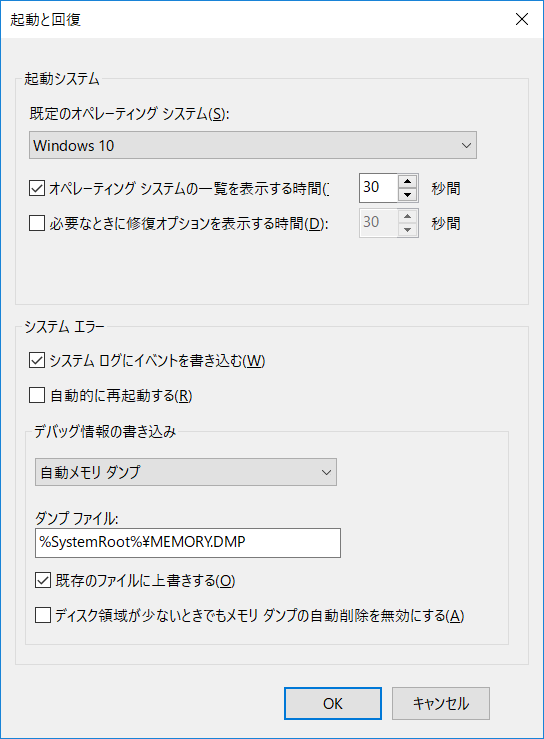
PS D:\開発\16DAY> UIA_GetParentElement LocalizedControlType ClassName Name -------------------- --------- ---- タブ項目 コンピューター名 UIA_GetParentElement LocalizedControlType ClassName Name -------------------- --------- ---- タブ SysTabControl32 UIA_GetParentElement LocalizedControlType ClassName Name -------------------- --------- ---- ダイアログ #32770 システムのプロパティ Cached Current CachedParent CachedChildren ------ ------- ------------ -------------- System.Windows.Automation.AutomationElement+AutomationElementInformation System.Windows.Automation.AutomationElement+AutomationElementInformation True UIA_GetElementTreeWithOpt UIA_GetElementTreeWithOpt _システムのプロパティ UIA_GetElementTreeWithOpt _システムのプロパティ UIA_GetElementTreeWithOpt _システムのプロパティ UIA_GetElementTreeWithOpt _システムのプロパティ UIA_GetElementTreeWithOpt UIA_GetElementTreeWithOpt _システムのプロパティ_コンピューター名 UIA_GetElementTreeWithOpt _システムのプロパティ_コンピューター名 UIA_GetElementTreeWithOpt _システムのプロパティ_コンピューター名 UIA_GetElementTreeWithOpt _システムのプロパティ_コンピューター名 UIA_GetElementTreeWithOpt _システムのプロパティ_コンピューター名 UIA_GetElementTreeWithOpt _システムのプロパティ_コンピューター名 UIA_GetElementTreeWithOpt _システムのプロパティ_コンピューター名 UIA_GetElementTreeWithOpt _システムのプロパティ_コンピューター名 UIA_GetElementTreeWithOpt _システムのプロパティ_コンピューター名 UIA_GetElementTreeWithOpt _システムのプロパティ_コンピューター名 UIA_GetElementTreeWithOpt _システムのプロパティ_コンピューター名 UIA_GetElementTreeWithOpt _システムのプロパティ_コンピューター名 UIA_GetElementTreeWithOpt _システムのプロパティ_コンピューター名 UIA_GetElementTreeWithOpt _システムのプロパティ_コンピューター名 UIA_GetElementTreeWithOpt UIA_GetElementTreeWithOpt UIA_GetElementTreeWithOpt UIA_GetElementTreeWithOpt UIA_GetElementTreeWithOpt _システムのプロパティ UIA_GetElementTreeWithOpt UIA_GetElementTreeWithOpt UIA_GetElementTreeWithOpt ControlType ClassName Value action trigger Name key ----------- --------- ----- ------ ------- ---- --- ダイアログ #32770 システムのプロパティ _システムのプロパティ ボタン Button OK _システムのプロパティ_OK ボタン Button キャンセル _システムのプロパティ_キャンセル ボタン Button 適用(A) _システムのプロパティ_適用(A) タブ SysTabControl32 タブ項目 コンピューター名 _システムのプロパティ_コンピューター名 テキスト Static コンピューターの説明(D): 編集 Edit コンピューターの説明(D): _システムのプロパティ_コンピューター名_コンピューターの説明(D): テキスト Static 例: "キッチンのコンピューター"、"仕事用コンピューター" テキスト Static フル コンピューター名: 編集 Edit DESKTOP-CSQKB17 フル コンピューター名: _システムのプロパティ_コンピューター名_フル コンピューター名: テキスト Static ワークグループ: 編集 Edit WORKGROUP ワークグループ: _システムのプロパティ_コンピューター名_ワークグループ: テキスト Static ドメインまたはワークグループに参加するためのウィザードを使用するには [ネットワーク ID] をクリックしてください。 ボタン Button ネットワーク ID(N)... _システムのプロパティ_コンピューター名_ネットワーク ID(N)... テキスト Static このコンピューターの名前を変更するには、[変更] をクリックしてください。 ボタン Button 変更(C)... _システムのプロパティ_コンピューター名_変更(C)... テキスト Static イメージ Static テキスト Static 次の情報は、このコンピューターをネットワーク上で識別するために使われます。 タブ項目 ハードウェア _システムのプロパティ_ハードウェア タブ項目 詳細設定 _システムのプロパティ_詳細設定 タブ項目 システムの保護 _システムのプロパティ_システムの保護 タブ項目 リモート _システムのプロパティ_リモート タイトル バー システムのプロパティ メニュー バー システム メニュー バー メニュー項目 システム ボタン 閉じる _システムのプロパティ_閉じる ControlType : 編集 ClassName : Edit EventID : AutomationElementIdentifiers.AutomationFocusChangedEvent Property : Name : コンピューターの説明(D): Id ProgrammaticName -- ---------------- 10002 ValuePatternIdentifiers.Pattern 10014 TextPatternIdentifiers.Pattern PS D:\開発\16DAY> UIA_GetParentElement LocalizedControlType ClassName Name -------------------- --------- ---- タブ項目 詳細設定 UIA_GetParentElement LocalizedControlType ClassName Name -------------------- --------- ---- タブ SysTabControl32 UIA_GetParentElement LocalizedControlType ClassName Name -------------------- --------- ---- ダイアログ #32770 システムのプロパティ Cached Current CachedParent CachedChildren ------ ------- ------------ -------------- System.Windows.Automation.AutomationElement+AutomationElementInformation System.Windows.Automation.AutomationElement+AutomationElementInformation True UIA_GetElementTreeWithOpt UIA_GetElementTreeWithOpt _システムのプロパティ UIA_GetElementTreeWithOpt _システムのプロパティ UIA_GetElementTreeWithOpt _システムのプロパティ UIA_GetElementTreeWithOpt _システムのプロパティ UIA_GetElementTreeWithOpt UIA_GetElementTreeWithOpt UIA_GetElementTreeWithOpt UIA_GetElementTreeWithOpt _システムのプロパティ_詳細設定 UIA_GetElementTreeWithOpt _システムのプロパティ_詳細設定 UIA_GetElementTreeWithOpt _システムのプロパティ_詳細設定 UIA_GetElementTreeWithOpt _システムのプロパティ_詳細設定 UIA_GetElementTreeWithOpt _システムのプロパティ_詳細設定 UIA_GetElementTreeWithOpt _システムのプロパティ_詳細設定 UIA_GetElementTreeWithOpt _システムのプロパティ_詳細設定 UIA_GetElementTreeWithOpt _システムのプロパティ_詳細設定 UIA_GetElementTreeWithOpt _システムのプロパティ_詳細設定 UIA_GetElementTreeWithOpt _システムのプロパティ_詳細設定 UIA_GetElementTreeWithOpt _システムのプロパティ_詳細設定 UIA_GetElementTreeWithOpt UIA_GetElementTreeWithOpt UIA_GetElementTreeWithOpt _システムのプロパティ UIA_GetElementTreeWithOpt UIA_GetElementTreeWithOpt UIA_GetElementTreeWithOpt ControlType ClassName Value action trigger Name key ----------- --------- ----- ------ ------- ---- --- ダイアログ #32770 システムのプロパティ _システムのプロパティ ボタン Button OK _システムのプロパティ_OK ボタン Button キャンセル _システムのプロパティ_キャンセル ボタン Button 適用(A) _システムのプロパティ_適用(A) タブ SysTabControl32 タブ項目 コンピューター名 _システムのプロパティ_コンピューター名 タブ項目 ハードウェア _システムのプロパティ_ハードウェア タブ項目 詳細設定 _システムのプロパティ_詳細設定 テキスト Static Administrator としてログオンしない場合は、これらのほとんどは変更できません。 グループ Button パフォーマンス テキスト Static 視覚効果、プロセッサのスケジュール、メモリ使用、および仮想メモリ ボタン Button 設定(S)... _システムのプロパティ_詳細設定_設定(S)... グループ Button ユーザー プロファイル テキスト Static サインインに関連したデスクトップ設定 ボタン Button 設定(E)... _システムのプロパティ_詳細設定_設定(E)... グループ Button 起動と回復 テキスト Static システム起動、システム障害、およびデバッグ情報 ボタン Button 設定(T) _システムのプロパティ_詳細設定_設定(T) ボタン Button 環境変数(N)... _システムのプロパティ_詳細設定_環境変数(N)... タブ項目 システムの保護 _システムのプロパティ_システムの保護 タブ項目 リモート _システムのプロパティ_リモート タイトル バー システムのプロパティ メニュー バー システム メニュー バー メニュー項目 システム ボタン 閉じる _システムのプロパティ_閉じる MergeUIA ControlType ClassName Name OBJN ----------- --------- ---- ---- ダイアログ #32770 システムのプロパティ 1 ボタン Button OK 1 ボタン Button キャンセル 1 ボタン Button 適用(A) 1 タブ SysTabControl32 1 タブ項目 コンピューター名 1 テキスト Static コンピューターの説明(D): 1 編集 Edit コンピューターの説明(D): 1 テキスト Static 例: "キッチンのコンピューター"、"仕事用コンピューター" 1 テキスト Static フル コンピューター名: 1 編集 Edit フル コンピューター名: 1 テキスト Static ワークグループ: 1 編集 Edit ワークグループ: 1 テキスト Static ドメインまたはワークグループに参加するためのウィザードを使用するには [ネットワーク ID] をクリックしてください。 1 ボタン Button ネットワーク ID(N)... 1 テキスト Static このコンピューターの名前を変更するには、[変更] をクリックしてください。 1 ボタン Button 変更(C)... 1 テキスト Static 1 イメージ Static 1 テキスト Static 次の情報は、このコンピューターをネットワーク上で識別するために使われます。 1 タブ項目 ハードウェア 1 タブ項目 詳細設定 1 タブ項目 システムの保護 1 タブ項目 リモート 1 タイトル バー システムのプロパティ 1 メニュー バー システム メニュー バー 1 メニュー項目 システム 1 ボタン 閉じる 1 ControlType ClassName Name OBJN ----------- --------- ---- ---- ダイアログ #32770 システムのプロパティ 2 ボタン Button OK 2 ボタン Button キャンセル 2 ボタン Button 適用(A) 2 タブ SysTabControl32 2 タブ項目 コンピューター名 2 タブ項目 ハードウェア 2 タブ項目 詳細設定 2 テキスト Static Administrator としてログオンしない場合は、これらのほとんどは変更できません。 2 グループ Button パフォーマンス 2 テキスト Static 視覚効果、プロセッサのスケジュール、メモリ使用、および仮想メモリ 2 ボタン Button 設定(S)... 2 グループ Button ユーザー プロファイル 2 テキスト Static サインインに関連したデスクトップ設定 2 ボタン Button 設定(E)... 2 グループ Button 起動と回復 2 テキスト Static システム起動、システム障害、およびデバッグ情報 2 ボタン Button 設定(T) 2 ボタン Button 環境変数(N)... 2 タブ項目 システムの保護 2 タブ項目 リモート 2 タイトル バー システムのプロパティ 2 メニュー バー システム メニュー バー 2 メニュー項目 システム 2 ボタン 閉じる 2 controlType ClassName Name SideIndicator ----------- --------- ---- ------------- ダイアログ #32770 システムのプロパティ == ボタン Button OK == ボタン Button キャンセル == ボタン Button 適用(A) == タブ SysTabControl32 == タブ項目 コンピューター名 == タブ項目 ハードウェア == タブ項目 詳細設定 == タブ項目 システムの保護 == タブ項目 リモート == タイトル バー システムのプロパティ == メニュー バー システム メニュー バー == メニュー項目 システム == ボタン 閉じる == テキスト Static Administrator としてログオンしない場合は、これらのほとんどは変更できません。 => グループ Button パフォーマンス => テキスト Static 視覚効果、プロセッサのスケジュール、メモリ使用、および仮想メモリ => ボタン Button 設定(S)... => グループ Button ユーザー プロファイル => テキスト Static サインインに関連したデスクトップ設定 => ボタン Button 設定(E)... => グループ Button 起動と回復 => テキスト Static システム起動、システム障害、およびデバッグ情報 => ボタン Button 設定(T) => ボタン Button 環境変数(N)... => テキスト Static コンピューターの説明(D): <= 編集 Edit コンピューターの説明(D): <= テキスト Static 例: "キッチンのコンピューター"、"仕事用コンピューター" <= テキスト Static フル コンピューター名: <= 編集 Edit フル コンピューター名: <= テキスト Static ワークグループ: <= 編集 Edit ワークグループ: <= テキスト Static ドメインまたはワークグループに参加するためのウィザードを使用するには [ネットワーク ID] をクリックしてください。 <= ボタン Button ネットワーク ID(N)... <= テキスト Static このコンピューターの名前を変更するには、[変更] をクリックしてください。 <= ボタン Button 変更(C)... <= テキスト Static <= イメージ Static <= テキスト Static 次の情報は、このコンピューターをネットワーク上で識別するために使われます。 <= MergeObject ControlType ClassName Name OBJN ----------- --------- ---- ---- ダイアログ #32770 システムのプロパティ 1 ボタン Button OK 1 ボタン Button キャンセル 1 ボタン Button 適用(A) 1 タブ SysTabControl32 1 タブ項目 コンピューター名 1 テキスト Static コンピューターの説明(D): 1 編集 Edit コンピューターの説明(D): 1 テキスト Static 例: "キッチンのコンピューター"、"仕事用コンピューター" 1 テキスト Static フル コンピューター名: 1 編集 Edit フル コンピューター名: 1 テキスト Static ワークグループ: 1 編集 Edit ワークグループ: 1 テキスト Static ドメインまたはワークグループに参加するためのウィザードを使用するには [ネットワーク ID] をクリックしてください。 1 ボタン Button ネットワーク ID(N)... 1 テキスト Static このコンピューターの名前を変更するには、[変更] をクリックしてください。 1 ボタン Button 変更(C)... 1 テキスト Static 1 イメージ Static 1 テキスト Static 次の情報は、このコンピューターをネットワーク上で識別するために使われます。 1 タブ項目 ハードウェア 1 タブ項目 詳細設定 1 テキスト Static Administrator としてログオンしない場合は、これらのほとんどは変更できません。 2 グループ Button パフォーマンス 2 テキスト Static 視覚効果、プロセッサのスケジュール、メモリ使用、および仮想メモリ 2 ボタン Button 設定(S)... 2 グループ Button ユーザー プロファイル 2 テキスト Static サインインに関連したデスクトップ設定 2 ボタン Button 設定(E)... 2 グループ Button 起動と回復 2 テキスト Static システム起動、システム障害、およびデバッグ情報 2 ボタン Button 設定(T) 2 ボタン Button 環境変数(N)... 2 タブ項目 システムの保護 1 タブ項目 リモート 1 タイトル バー システムのプロパティ 1 メニュー バー システム メニュー バー 1 メニュー項目 システム 1 ボタン 閉じる 1 ControlType ClassName Value action trigger Name key ----------- --------- ----- ------ ------- ---- --- ダイアログ #32770 システムのプロパティ _システムのプロパティ ボタン Button OK _システムのプロパティ_OK ボタン Button キャンセル _システムのプロパティ_キャンセル ボタン Button 適用(A) _システムのプロパティ_適用(A) タブ SysTabControl32 タブ項目 コンピューター名 _システムのプロパティ_コンピューター名 テキスト Static コンピューターの説明(D): 編集 Edit コンピューターの説明(D): _システムのプロパティ_コンピューター名_コンピューターの説明(D): テキスト Static 例: "キッチンのコンピューター"、"仕事用コンピューター" テキスト Static フル コンピューター名: 編集 Edit DESKTOP-CSQKB17 フル コンピューター名: _システムのプロパティ_コンピューター名_フル コンピューター名: テキスト Static ワークグループ: 編集 Edit WORKGROUP ワークグループ: _システムのプロパティ_コンピューター名_ワークグループ: テキスト Static ドメインまたはワークグループに参加するためのウィザードを使用するには [ネットワーク ID] をクリックしてください。 ボタン Button ネットワーク ID(N)... _システムのプロパティ_コンピューター名_ネットワーク ID(N)... テキスト Static このコンピューターの名前を変更するには、[変更] をクリックしてください。 ボタン Button 変更(C)... _システムのプロパティ_コンピューター名_変更(C)... テキスト Static イメージ Static テキスト Static 次の情報は、このコンピューターをネットワーク上で識別するために使われます。 タブ項目 ハードウェア _システムのプロパティ_ハードウェア タブ項目 詳細設定 _システムのプロパティ_詳細設定 テキスト Static Administrator としてログオンしない場合は、これらのほとんどは変更できません。 グループ Button パフォーマンス テキスト Static 視覚効果、プロセッサのスケジュール、メモリ使用、および仮想メモリ ボタン Button 設定(S)... _システムのプロパティ_詳細設定_設定(S)... グループ Button ユーザー プロファイル テキスト Static サインインに関連したデスクトップ設定 ボタン Button 設定(E)... _システムのプロパティ_詳細設定_設定(E)... グループ Button 起動と回復 テキスト Static システム起動、システム障害、およびデバッグ情報 ボタン Button 設定(T) _システムのプロパティ_詳細設定_設定(T) ボタン Button 環境変数(N)... _システムのプロパティ_詳細設定_環境変数(N)... タブ項目 システムの保護 _システムのプロパティ_システムの保護 タブ項目 リモート _システムのプロパティ_リモート タイトル バー システムのプロパティ メニュー バー システム メニュー バー メニュー項目 システム ボタン 閉じる _システムのプロパティ_閉じる ControlType : ボタン ClassName : Button EventID : AutomationElementIdentifiers.AutomationFocusChangedEvent Property : Name : 設定(S)... Id ProgrammaticName -- ---------------- 10000 InvokePatternIdentifiers.Pattern
diffをそのまま使用出来ないので
diffもどきを作る羽目になりました。
あとは挿入の実装。。
~UI Automationで画面情報取得!その5~ UI Automation with PowerShell 奮戦記 15日目
UI Automation*1で遊ぼう!
UI Automation の画面情報の取得機能を使用したWindows設定書生成の自動化に挑戦しています。Windowsの標準実装のみ、PowerShellのみで動作させることを目指しています。
UI Automationでの画面操作の捕捉をPowerShellで出来るようにEventタイプを.Net Framworkで実装しました。
実装した開発ライブラリ、共通で使用するスクリプトについては以下を確認してくださいね。
https://amon52280sub.hateblo.jp/entry/2019/01/23/032420
画面情報を取得してみましょう。
制御値を追加しました。 Windows設定値生成、Windows自動設定に使用することになります。
PowerShell Version3(管理者権限)で実行してみる。
[CmdletBinding()]
Param (
  [int]$global:delay = 500
)

# UI Automation 共通ファンクションを組み込む
. .\UIA.ps1

# 初期化
$global:uia = UIA_Init
$global:Window = @{}

# Timer イベント捕捉
$global:timer = New-Object System.Timers.Timer
$timer.Interval = 100
$timer.Enabled = $false
Register-ObjectEvent -InputObject $timer -EventName Elapsed -Action {
  try {
  $timer.Enabled = $false

  $name = $ev[0].current.name
  $controltype = $ev[0].current.localizedcontroltype
  $classname = $ev[0].current.classname
  $eventid = $ev[1].EventId.ProgrammaticName

  if ($stop) {return}
  if ($name -match "powershell") {return}
  # ウインドウ or ダイアログ
  $p = UIA_GetParentElement $ev[0]
  Write-Host $($p | Out-String)
  Write-Host ($p -ne $null)
  if ($p -ne $null) {
    if ($p.current.name -eq "") {return}
    if ($p.current.name -match "powershell") {return}
    # ツリー構造で表示 設定値 制御値 表示
    $tree = UIA_GetElementTreeWithOpt $p
    Write-Host $($tree | UIA_OutPut -mode ElementWithOpt -action -trigger -key | ft -wrap | Out-String)
    #Write-Host $($tree | UIA_OutPut -mode ElementWithOpt -action -trigger -key | Out-String)
    $Window[$p.current.name] = $tree
  }
  Write-Host $(UIA_OutPut -element $ev[0] -event $ev[1] -mode Event | Out-String)
  Write-Host $($ev[0].GetSupportedPatterns() | Out-String)
  $timer.Enabled = $false
  } catch {
    Write-Host $_
  }
} | Out-Null

# UI Automation イベント捕捉
Register-ObjectEvent -InputObject $uia -EventName UIChange -Action {
  try {
  #$timer.Enabled = $false

  if ($args -eq $null) {return}
  if ($args[0] -eq $null) {return}
  if ($args -eq $ev) {return}

  $global:ev = $args
  $name = $ev[0].current.name
  $controltype = $ev[0].current.localizedcontroltype
  $classname = $ev[0].current.classname
  $eventid = $ev[1].EventId.ProgrammaticName

  if ($name -match "powershell") {return}
  switch ($eventid) {
    "AutomationElementIdentifiers.AutomationFocusChangedEvent" {
      #$uia.SetEvent($ev[0])
      $timer.Interval = $delay
      $timer.Enabled = $true
    }
    "AutomationElementIdentifiers.AutomationPropertyChangedEvent" {
      $timer.Interval = $delay
      $timer.Enabled = $false
    }
    "WindowPatternIdentifiers.WindowOpenedProperty"{
      # ツリー構造で表示 設定値表示
      #Write-Host $(UIA_GetElementTreeWithOpt $ev[0] | UIA_OutPut -mode ElementWithOpt | Out-String)
      #Write-Host $(UIA_OutPut -element $ev[0] -event $ev[1] -mode Event | Out-String)
      $timer.Interval = $delay
      $timer.Enabled = $true
    }
    "WindowPatternIdentifiers.WindowClosedProperty"{
      $timer.Interval = $delay
      $timer.Enabled = $false
    }
   default {
      Write-Host $(UIA_OutPut -element $ev[0] -event $ev[1] -mode Event | Out-String)
      $timer.Interval = $delay
      $timer.Enabled = $false
    }
  }
  } catch {
    Write-Host $_
  }
} | Out-Null

# イベントスタート
$uia.StartEvent()
"画面情報取得スタート!!"
実行結果
PS D:\開発\15DAY> UIA_GetParentElement LocalizedControlType ClassName Name -------------------- --------- ---- タブ項目 コンピューター名 UIA_GetParentElement LocalizedControlType ClassName Name -------------------- --------- ---- タブ SysTabControl32 UIA_GetParentElement LocalizedControlType ClassName Name -------------------- --------- ---- ダイアログ #32770 システムのプロパティ Cached Current CachedParent CachedChildren ------ ------- ------------ -------------- System.Windows.Automation.AutomationElement+AutomationElementInformation System.Windows.Automation.AutomationElement+AutomationElementInformation True UIA_GetElementTreeWithOpt UIA_GetElementTreeWithOpt _システムのプロパティ UIA_GetElementTreeWithOpt _システムのプロパティ UIA_GetElementTreeWithOpt _システムのプロパティ UIA_GetElementTreeWithOpt _システムのプロパティ UIA_GetElementTreeWithOpt UIA_GetElementTreeWithOpt _システムのプロパティ_コンピューター名 UIA_GetElementTreeWithOpt _システムのプロパティ_コンピューター名 UIA_GetElementTreeWithOpt _システムのプロパティ_コンピューター名 UIA_GetElementTreeWithOpt _システムのプロパティ_コンピューター名 UIA_GetElementTreeWithOpt _システムのプロパティ_コンピューター名 UIA_GetElementTreeWithOpt _システムのプロパティ_コンピューター名 UIA_GetElementTreeWithOpt _システムのプロパティ_コンピューター名 UIA_GetElementTreeWithOpt _システムのプロパティ_コンピューター名 UIA_GetElementTreeWithOpt _システムのプロパティ_コンピューター名 UIA_GetElementTreeWithOpt _システムのプロパティ_コンピューター名 UIA_GetElementTreeWithOpt _システムのプロパティ_コンピューター名 UIA_GetElementTreeWithOpt _システムのプロパティ_コンピューター名 UIA_GetElementTreeWithOpt _システムのプロパティ_コンピューター名 UIA_GetElementTreeWithOpt _システムのプロパティ_コンピューター名 UIA_GetElementTreeWithOpt UIA_GetElementTreeWithOpt UIA_GetElementTreeWithOpt UIA_GetElementTreeWithOpt UIA_GetElementTreeWithOpt _システムのプロパティ UIA_GetElementTreeWithOpt UIA_GetElementTreeWithOpt UIA_GetElementTreeWithOpt ControlType ClassName Value action trigger Name key ----------- --------- ----- ------ ------- ---- --- ダイアログ #32770 システムのプロパティ _システムのプロパティ ボタン Button OK _システムのプロパティ_OK ボタン Button キャンセル _システムのプロパティ_キャンセル ボタン Button 適用(A) _システムのプロパティ_適用(A) タブ SysTabControl32 タブ項目 コンピューター名 _システムのプロパティ_コンピューター名 テキスト Static コンピューターの説明(D): 編集 Edit コンピューターの説明(D): _システムのプロパティ_コンピューター名_コンピューターの説明(D): テキスト Static 例: "キッチンのコンピューター"、"仕事用コンピューター" テキスト Static フル コンピューター名: 編集 Edit DESKTOP-CSQKB17 フル コンピューター名: _システムのプロパティ_コンピューター名_フル コンピューター名: テキスト Static ワークグループ: 編集 Edit WORKGROUP ワークグループ: _システムのプロパティ_コンピューター名_ワークグループ: テキスト Static ドメインまたはワークグループに参加するためのウィザードを使用するには [ネットワーク ID] をクリックしてください。 ボタン Button ネットワーク ID(N)... _システムのプロパティ_コンピューター名_ネットワーク ID(N)... テキスト Static このコンピューターの名前を変更するには、[変更] をクリックしてください。 ボタン Button 変更(C)... _システムのプロパティ_コンピューター名_変更(C)... テキスト Static イメージ Static テキスト Static 次の情報は、このコンピューターをネットワーク上で識別するために使われます。 タブ項目 ハードウェア _システムのプロパティ_ハードウェア タブ項目 詳細設定 _システムのプロパティ_詳細設定 タブ項目 システムの保護 _システムのプロパティ_システムの保護 タブ項目 リモート _システムのプロパティ_リモート タイトル バー システムのプロパティ メニュー バー システム メニュー バー メニュー項目 システム ボタン 閉じる _システムのプロパティ_閉じる ControlType : 編集 ClassName : Edit EventID : AutomationElementIdentifiers.AutomationFocusChangedEvent Property : Name : コンピューターの説明(D): Id ProgrammaticName -- ---------------- 10002 ValuePatternIdentifiers.Pattern 10014 TextPatternIdentifiers.Pattern PS D:\開発\15DAY> UIA_GetParentElement LocalizedControlType ClassName Name -------------------- --------- ---- タブ項目 詳細設定 UIA_GetParentElement LocalizedControlType ClassName Name -------------------- --------- ---- タブ SysTabControl32 UIA_GetParentElement LocalizedControlType ClassName Name -------------------- --------- ---- ダイアログ #32770 システムのプロパティ Cached Current CachedParent CachedChildren ------ ------- ------------ -------------- System.Windows.Automation.AutomationElement+AutomationElementInformation System.Windows.Automation.AutomationElement+AutomationElementInformation True UIA_GetElementTreeWithOpt UIA_GetElementTreeWithOpt _システムのプロパティ UIA_GetElementTreeWithOpt _システムのプロパティ UIA_GetElementTreeWithOpt _システムのプロパティ UIA_GetElementTreeWithOpt _システムのプロパティ UIA_GetElementTreeWithOpt UIA_GetElementTreeWithOpt UIA_GetElementTreeWithOpt UIA_GetElementTreeWithOpt _システムのプロパティ_詳細設定 UIA_GetElementTreeWithOpt _システムのプロパティ_詳細設定 UIA_GetElementTreeWithOpt _システムのプロパティ_詳細設定 UIA_GetElementTreeWithOpt _システムのプロパティ_詳細設定 UIA_GetElementTreeWithOpt _システムのプロパティ_詳細設定 UIA_GetElementTreeWithOpt _システムのプロパティ_詳細設定 UIA_GetElementTreeWithOpt _システムのプロパティ_詳細設定 UIA_GetElementTreeWithOpt _システムのプロパティ_詳細設定 UIA_GetElementTreeWithOpt _システムのプロパティ_詳細設定 UIA_GetElementTreeWithOpt _システムのプロパティ_詳細設定 UIA_GetElementTreeWithOpt _システムのプロパティ_詳細設定 UIA_GetElementTreeWithOpt UIA_GetElementTreeWithOpt UIA_GetElementTreeWithOpt _システムのプロパティ UIA_GetElementTreeWithOpt UIA_GetElementTreeWithOpt UIA_GetElementTreeWithOpt ControlType ClassName Value action trigger Name key ----------- --------- ----- ------ ------- ---- --- ダイアログ #32770 システムのプロパティ _システムのプロパティ ボタン Button OK _システムのプロパティ_OK ボタン Button キャンセル _システムのプロパティ_キャンセル ボタン Button 適用(A) _システムのプロパティ_適用(A) タブ SysTabControl32 タブ項目 コンピューター名 _システムのプロパティ_コンピューター名 タブ項目 ハードウェア _システムのプロパティ_ハードウェア タブ項目 詳細設定 _システムのプロパティ_詳細設定 テキスト Static Administrator としてログオンしない場合は、これらのほとんどは変更できません。 グループ Button パフォーマンス テキスト Static 視覚効果、プロセッサのスケジュール、メモリ使用、および仮想メモリ ボタン Button 設定(S)... _システムのプロパティ_詳細設定_設定(S)... グループ Button ユーザー プロファイル テキスト Static サインインに関連したデスクトップ設定 ボタン Button 設定(E)... _システムのプロパティ_詳細設定_設定(E)... グループ Button 起動と回復 テキスト Static システム起動、システム障害、およびデバッグ情報 ボタン Button 設定(T) _システムのプロパティ_詳細設定_設定(T) ボタン Button 環境変数(N)... _システムのプロパティ_詳細設定_環境変数(N)... タブ項目 システムの保護 _システムのプロパティ_システムの保護 タブ項目 リモート _システムのプロパティ_リモート タイトル バー システムのプロパティ メニュー バー システム メニュー バー メニュー項目 システム ボタン 閉じる _システムのプロパティ_閉じる ControlType : ボタン ClassName : Button EventID : AutomationElementIdentifiers.AutomationFocusChangedEvent Property : Name : 設定(S)... Id ProgrammaticName -- ---------------- 10000 InvokePatternIdentifiers.Pattern PS D:\開発\15DAY> UIA_GetParentElement Cached Current CachedParent CachedChildren ------ ------- ------------ -------------- System.Windows.Automation.AutomationElement+AutomationElementInformation System.Windows.Automation.AutomationElement+AutomationElementInformation True UIA_GetElementTreeWithOpt UIA_GetElementTreeWithOpt _起動と回復 UIA_GetElementTreeWithOpt _起動と回復 UIA_GetElementTreeWithOpt _起動と回復 UIA_GetElementTreeWithOpt UIA_GetElementTreeWithOpt UIA_GetElementTreeWithOpt UIA_GetElementTreeWithOpt _起動と回復 UIA_GetElementTreeWithOpt _起動と回復 UIA_GetElementTreeWithOpt UIA_GetElementTreeWithOpt UIA_GetElementTreeWithOpt _起動と回復 UIA_GetElementTreeWithOpt _起動と回復 UIA_GetElementTreeWithOpt _起動と回復 UIA_GetElementTreeWithOpt UIA_GetElementTreeWithOpt UIA_GetElementTreeWithOpt _起動と回復 UIA_GetElementTreeWithOpt _起動と回復 UIA_GetElementTreeWithOpt _起動と回復 UIA_GetElementTreeWithOpt _起動と回復 UIA_GetElementTreeWithOpt _起動と回復 UIA_GetElementTreeWithOpt _起動と回復 UIA_GetElementTreeWithOpt UIA_GetElementTreeWithOpt UIA_GetElementTreeWithOpt UIA_GetElementTreeWithOpt UIA_GetElementTreeWithOpt UIA_GetElementTreeWithOpt UIA_GetElementTreeWithOpt UIA_GetElementTreeWithOpt UIA_GetElementTreeWithOpt _起動と回復 UIA_GetElementTreeWithOpt _起動と回復 UIA_GetElementTreeWithOpt _起動と回復 UIA_GetElementTreeWithOpt _起動と回復 UIA_GetElementTreeWithOpt _起動と回復 UIA_GetElementTreeWithOpt _起動と回復 UIA_GetElementTreeWithOpt _起動と回復 UIA_GetElementTreeWithOpt UIA_GetElementTreeWithOpt UIA_GetElementTreeWithOpt ControlType ClassName Value action trigger Name key ----------- --------- ----- ------ ------- ---- --- ダイアログ #32770 起動と回復 _起動と回復 グループ Button 起動システム テキスト Static 既定のオペレーティング システム(S): コンボ ボックス ComboBox 既定のオペレーティング システム(S): 一覧 ComboLBox Windows 10 既定のオペレーティング システム(S): 一覧項目 True Windows 10 _起動と回復_Windows 10 ボタン ドロップ ダウン ボタン _起動と回復_ドロップ ダウン ボタン チェック ボックス Button On オペレーティング システムの一覧を表示する時間(T): _起動と回復_オペレーティング システムの一覧を表示する時間(T): スピン msctls_updown32 30 既定のオペレーティング システム(S): ボタン 進む _起動と回復_進む ボタン 戻る _起動と回復_戻る テキスト Static 秒間 チェック ボックス Button Off 必要なときに修復オプションを表示する時間(D): _起動と回復_必要なときに修復オプションを表示する時間(D): スピン msctls_updown32 30 秒間 ボタン 進む _起動と回復_進む ボタン 戻る _起動と回復_戻る テキスト Static 秒間 グループ Button システム エラー チェック ボックス Button On システム ログにイベントを書き込む(W) _起動と回復_システム ログにイベントを書き込む(W) チェック ボックス Button Off 自動的に再起動する(R) _起動と回復_自動的に再起動する(R) グループ Button デバッグ情報の書き込み コンボ ボックス ComboBox デバッグ情報の書き込み 一覧 ComboLBox 自動メモリ ダンプ デバッグ情報の書き込み 一覧項目 False (なし) _起動と回復_(なし) 一覧項目 False 最小メモリ ダンプ (256 KB) _起動と回復_最小メモリ ダンプ (256 KB) 一覧項目 False カーネル メモリ ダンプ _起動と回復_カーネル メモリ ダンプ 一覧項目 False 完全メモリ ダンプ _起動と回復_完全メモリ ダンプ 一覧項目 True 自動メモリ ダンプ _起動と回復_自動メモリ ダンプ 一覧項目 False アクティブ メモリ ダンプ _起動と回復_アクティブ メモリ ダンプ ボタン ドロップ ダウン ボタン _起動と回復_ドロップ ダウン ボタン テキスト Static ダンプ ファイル: 編集 Edit %SystemRoot%\MEMORY.DMP ダンプ ファイル: _起動と回復_ダンプ ファイル: チェック ボックス Button On 既存のファイルに上書きする(O) _起動と回復_既存のファイルに上書きする(O) チェック ボックス Button Off ディスク領域が少ないときでもメモリ ダンプの自動削除を無効にする(A) _起動と回復_ディスク領域が少ないときでもメモリ ダンプの自動削除を無効にする(A) ボタン Button OK _起動と回復_OK ボタン Button キャンセル _起動と回復_キャンセル タイトル バー 起動と回復 メニュー バー システム メニュー バー メニュー項目 システム ボタン 閉じる _起動と回復_閉じる ControlType : ダイアログ ClassName : #32770 EventID : WindowPatternIdentifiers.WindowOpenedProperty Property : Name : 起動と回復 Id ProgrammaticName -- ---------------- 10009 WindowPatternIdentifiers.Pattern 10016 TransformPatternIdentifiers.Pattern PS D:\開発\15DAY> exit PS D:\開発\15DAY>
これで、Windows設定書生成→Windows設定書→Windows自動設定を動作させる為のキー等の制御値の準備が出来ました。
あとはマージの方法ですかね。。
~UI Automationで画面情報取得!その4~ UI Automation with PowerShell 奮戦記 14日目
UI Automation*1で遊ぼう!
UI Automation の画面情報の取得機能を使用したWindows設定書生成の自動化に挑戦しています。Windowsの標準実装のみ、PowerShellのみで動作させることを目指しています。
UI Automationでの画面操作の捕捉をPowerShellで出来るようにEventタイプを.Net Framworkで実装しました。
実装した開発ライブラリ、共通で使用するスクリプトについては以下を確認してくださいね。
https://amon52280sub.hateblo.jp/entry/2019/01/23/032420
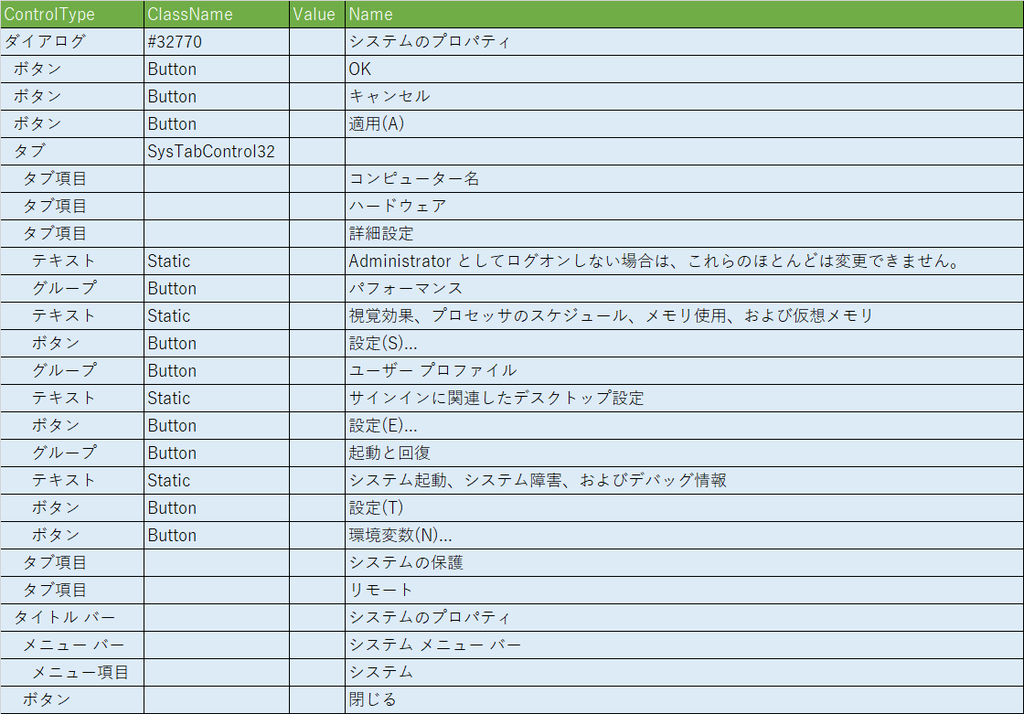
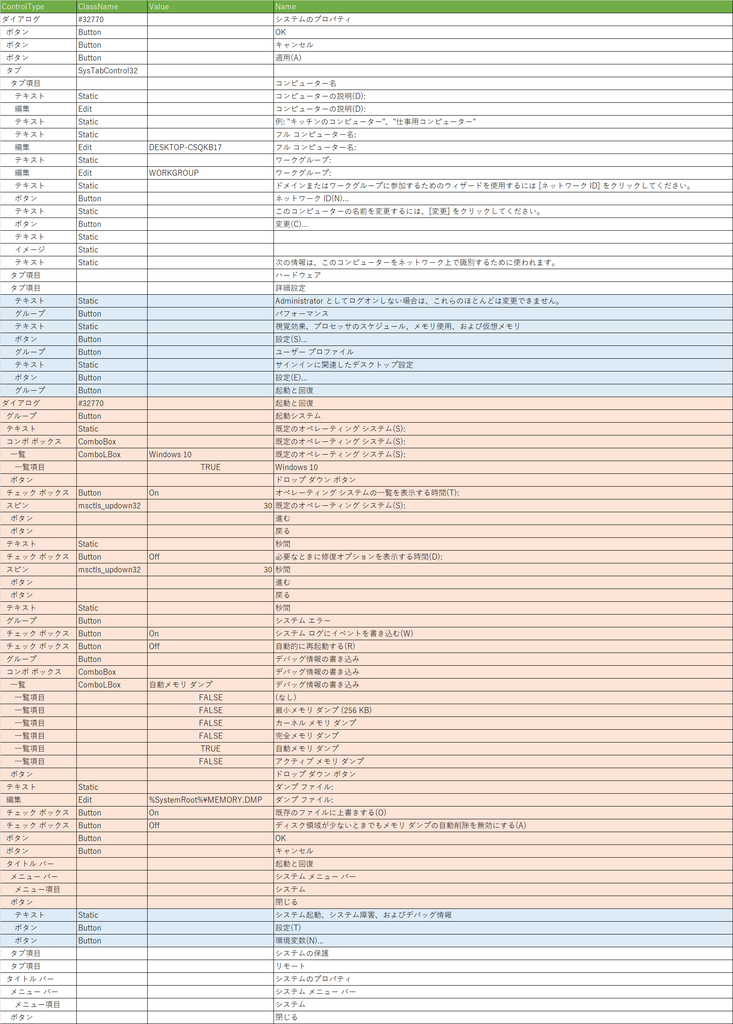
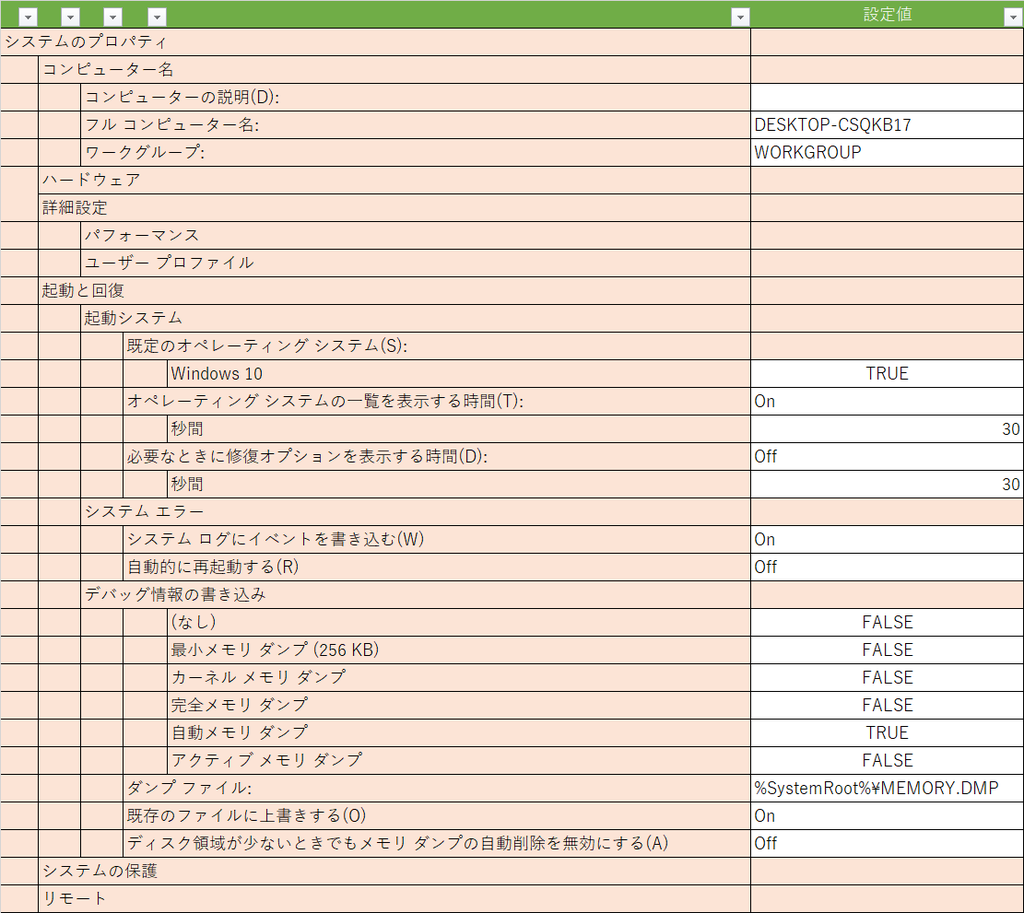
前回、以下の画面情報を取得しました。
システムのプロパティ(コンピュータ名)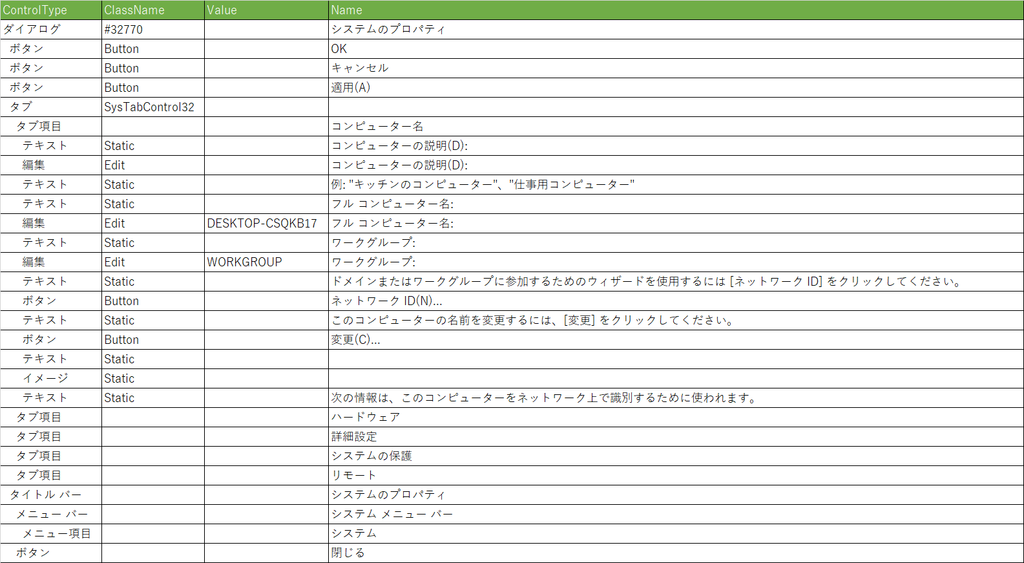
システムのプロパティ(詳細設定)
起動と回復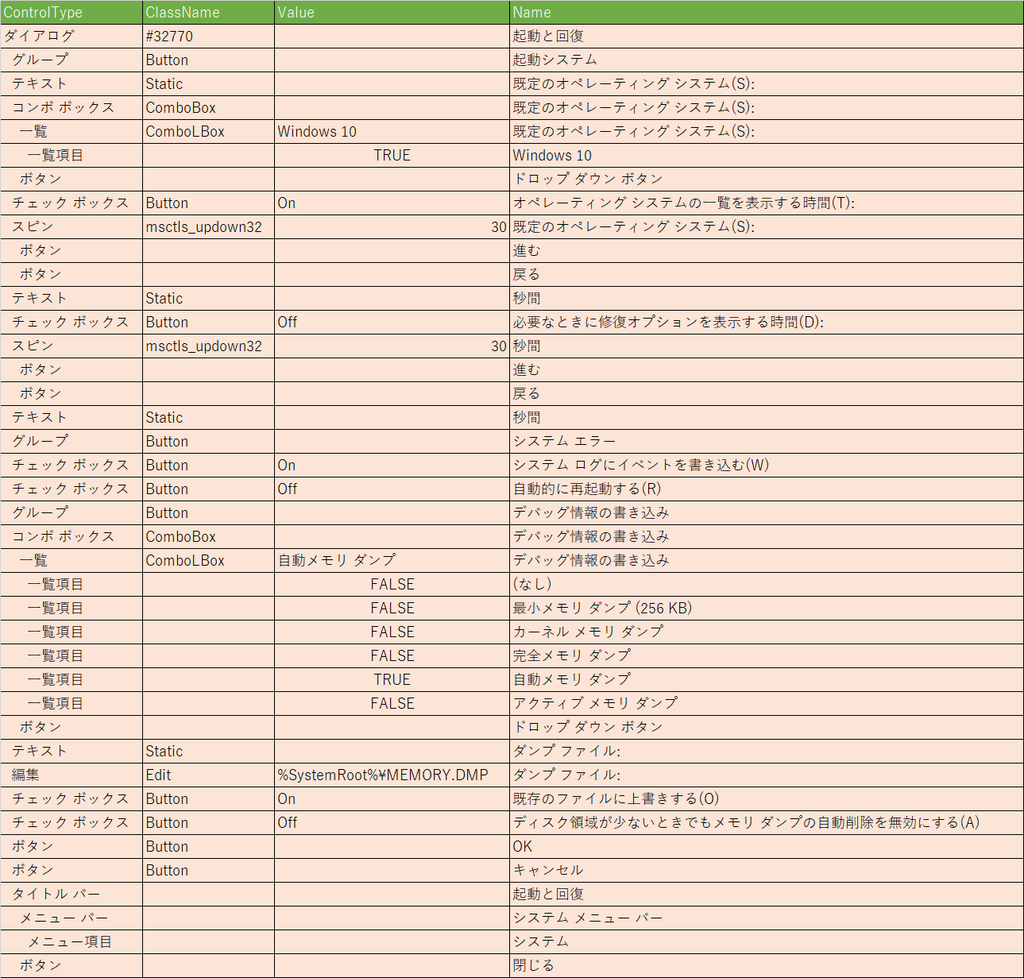
これをマージ、挿入して以下の表にします。
~UI Automationで画面情報取得!その3~ UI Automation with PowerShell 奮戦記 13日目
UI Automation*1で遊ぼう!
UI Automation の画面情報の取得機能を使用したWindows設定書生成の自動化に挑戦しています。Windowsの標準実装のみ、PowerShellのみで動作させることを目指しています。
UI Automationでの画面操作の捕捉をPowerShellで出来るようにEventタイプを.Net Framworkで実装しました。
実装した開発ライブラリ、共通で使用するスクリプトについては以下を確認してくださいね。
https://amon52280sub.hateblo.jp/entry/2019/01/23/032420
画面情報を取得してみましょう。
設定値の内容を表示するようにしました。
PowerShell Version3(管理者権限)で実行してみる。
[CmdletBinding()]
Param (
  [int]$global:delay = 500
)

# UI Automation 共通ファンクションを組み込む
. .\UIA.ps1

# 初期化
$global:uia = UIA_Init

# Timer イベント捕捉
$global:timer = New-Object System.Timers.Timer
$timer.Interval = 100
$timer.Enabled = $false
Register-ObjectEvent -InputObject $timer -EventName Elapsed -Action {
  try {
  $name = $ev[0].current.name
  $controltype = $ev[0].current.localizedcontroltype
  $classname = $ev[0].current.classname
  $eventid = $ev[1].EventId.ProgrammaticName

  if ($name -match "powershell") {return}
  # ウインドウ or ダイアログ
  $p = UIA_GetParentElement $ev[0]
  Write-Host $($p | Out-String)
  Write-Host ($p -ne $null)
  if ($p -ne $null) {
    # ツリー構造で表示 設定値表示
    Write-Host $(UIA_GetElementTreeWithOpt $p | UIA_OutPut -mode ElementWithOpt | Out-String)
  }
  Write-Host $(UIA_OutPut -element $ev[0] -event $ev[1] -mode Event | Out-String)
  Write-Host $($ev[0].GetSupportedPatterns() | Out-String)
  $timer.Enabled = $false
  } catch {
    Write-Host $_
  }
} | Out-Null

# UI Automation イベント捕捉
Register-ObjectEvent -InputObject $uia -EventName UIChange -Action {
  try {
  #$timer.Enabled = $false

  if ($args -eq $null) {return}
  if ($args[0] -eq $null) {return}

  $global:ev = $args
  $name = $ev[0].current.name
  $controltype = $ev[0].current.localizedcontroltype
  $classname = $ev[0].current.classname
  $eventid = $ev[1].EventId.ProgrammaticName

  if ($name -match "powershell") {return}
  switch ($eventid) {
    "AutomationElementIdentifiers.AutomationFocusChangedEvent" {
      #$uia.SetEvent($ev[0])
      $timer.Interval = $delay
      $timer.Enabled = $true
    }
    "AutomationElementIdentifiers.AutomationPropertyChangedEvent" {
      $timer.Interval = $delay
      $timer.Enabled = $false
    }
    "WindowPatternIdentifiers.WindowOpenedProperty"{
      # ツリー構造で表示 設定値表示
      #Write-Host $(UIA_GetElementTreeWithOpt $ev[0] | UIA_OutPut -mode ElementWithOpt | Out-String)
      #Write-Host $(UIA_OutPut -element $ev[0] -event $ev[1] -mode Event | Out-String)
      $timer.Interval = $delay
      $timer.Enabled = $true
    }
    "WindowPatternIdentifiers.WindowClosedProperty"{
      $timer.Interval = $delay
      $timer.Enabled = $false
    }
   default {
      Write-Host $(UIA_OutPut -element $ev[0] -event $ev[1] -mode Event | Out-String)
      $timer.Interval = $delay
      $timer.Enabled = $false
    }
  }
  } catch {
    Write-Host $_
  }
} | Out-Null

# イベントスタート
$uia.StartEvent()
"画面情報取得スタート!!"
実行結果
PS D:\開発\13DAY> UIA_GetParentElement

LocalizedControlType ClassName Name
 -------------------- --------- ----
タブ項目                           コンピューター名


UIA_GetParentElement

LocalizedControlType ClassName       Name
 -------------------- ---------       ----
タブ                   SysTabControl32


UIA_GetParentElement

LocalizedControlType ClassName Name
 -------------------- --------- ----
ダイアログ                #32770    システムのプロパティ


Cached                                                                   Current
 ------                                                                   -------
System.Windows.Automation.AutomationElement+AutomationElementInformation System.Windows.Automation.AutomationElement...


True
UIA_GetElementTreeWithOpt
UIA_GetElementTreeWithOpt
UIA_GetElementTreeWithOpt
UIA_GetElementTreeWithOpt
UIA_GetElementTreeWithOpt
UIA_GetElementTreeWithOpt
UIA_GetElementTreeWithOpt
UIA_GetElementTreeWithOpt
UIA_GetElementTreeWithOpt
UIA_GetElementTreeWithOpt
UIA_GetElementTreeWithOpt
UIA_GetElementTreeWithOpt
UIA_GetElementTreeWithOpt
UIA_GetElementTreeWithOpt
UIA_GetElementTreeWithOpt
UIA_GetElementTreeWithOpt
UIA_GetElementTreeWithOpt
UIA_GetElementTreeWithOpt
UIA_GetElementTreeWithOpt
UIA_GetElementTreeWithOpt
UIA_GetElementTreeWithOpt
UIA_GetElementTreeWithOpt
UIA_GetElementTreeWithOpt
UIA_GetElementTreeWithOpt
UIA_GetElementTreeWithOpt
UIA_GetElementTreeWithOpt
UIA_GetElementTreeWithOpt
UIA_GetElementTreeWithOpt

ControlType  ClassName       Value           Name
 -----------  ---------       -----           ----
ダイアログ        #32770                          システムのプロパティ
  ボタン        Button                          OK
  ボタン        Button                          キャンセル
  ボタン        Button                          適用(A)
  タブ         SysTabControl32
    タブ項目                                     コンピューター名
      テキスト   Static                          コンピューターの説明(D):
      編集     Edit                            コンピューターの説明(D):
      テキスト   Static                          例: "キッチンのコンピューター"、"仕事用コンピューター"

      テキスト   Static                          フル コンピューター名:
      編集     Edit            DESKTOP-CSQKB17 フル コンピューター名:
      テキスト   Static                          ワークグループ:
      編集     Edit            WORKGROUP       ワークグループ:
      テキスト   Static                          ドメインまたはワークグループに参加するためのウィザードを使用するには [ネッ
トワーク ID] をクリックしてください。
      ボタン    Button                          ネットワーク ID(N)...
      テキスト   Static                          このコンピューターの名前を変更するには、[変更] をクリックしてください。

      ボタン    Button                          変更(C)...
      テキスト   Static
      イメージ   Static
      テキスト   Static                          次の情報は、このコンピューターをネットワーク上で識別するために使われます。

    タブ項目                                     ハードウェア
    タブ項目                                     詳細設定
    タブ項目                                     システムの保護
    タブ項目                                     リモート
  タイトル バー                                    システムのプロパティ
    メニュー バー                                  システム メニュー バー
      メニュー項目                                 システム
    ボタン                                      閉じる


ControlType : 編集
ClassName   : Edit
EventID     : AutomationElementIdentifiers.AutomationFocusChangedEvent
Property    :
Name        : コンピューターの説明(D):


   Id ProgrammaticName
   -- ----------------
10002 ValuePatternIdentifiers.Pattern
10014 TextPatternIdentifiers.Pattern


PS D:\開発\13DAY> UIA_GetParentElement

LocalizedControlType ClassName Name
 -------------------- --------- ----
タブ項目                           詳細設定


UIA_GetParentElement

LocalizedControlType ClassName       Name
 -------------------- ---------       ----
タブ                   SysTabControl32


UIA_GetParentElement

LocalizedControlType ClassName Name
 -------------------- --------- ----
ダイアログ                #32770    システムのプロパティ


Cached                                                                   Current
 ------                                                                   -------
System.Windows.Automation.AutomationElement+AutomationElementInformation System.Windows.Automation.AutomationElement...


True
UIA_GetElementTreeWithOpt
UIA_GetElementTreeWithOpt
UIA_GetElementTreeWithOpt
UIA_GetElementTreeWithOpt
UIA_GetElementTreeWithOpt
UIA_GetElementTreeWithOpt
UIA_GetElementTreeWithOpt
UIA_GetElementTreeWithOpt
UIA_GetElementTreeWithOpt
UIA_GetElementTreeWithOpt
UIA_GetElementTreeWithOpt
UIA_GetElementTreeWithOpt
UIA_GetElementTreeWithOpt
UIA_GetElementTreeWithOpt
UIA_GetElementTreeWithOpt
UIA_GetElementTreeWithOpt
UIA_GetElementTreeWithOpt
UIA_GetElementTreeWithOpt
UIA_GetElementTreeWithOpt
UIA_GetElementTreeWithOpt
UIA_GetElementTreeWithOpt
UIA_GetElementTreeWithOpt
UIA_GetElementTreeWithOpt
UIA_GetElementTreeWithOpt
UIA_GetElementTreeWithOpt

ControlType  ClassName       Value Name
 -----------  ---------       ----- ----
ダイアログ        #32770                システムのプロパティ
  ボタン        Button                OK
  ボタン        Button                キャンセル
  ボタン        Button                適用(A)
  タブ         SysTabControl32
    タブ項目                           コンピューター名
    タブ項目                           ハードウェア
    タブ項目                           詳細設定
      テキスト   Static                Administrator としてログオンしない場合は、これらのほとんどは変更できません。
      グループ   Button                パフォーマンス
      テキスト   Static                視覚効果、プロセッサのスケジュール、メモリ使用、および仮想メモリ
      ボタン    Button                設定(S)...
      グループ   Button                ユーザー プロファイル
      テキスト   Static                サインインに関連したデスクトップ設定
      ボタン    Button                設定(E)...
      グループ   Button                起動と回復
      テキスト   Static                システム起動、システム障害、およびデバッグ情報
      ボタン    Button                設定(T)
      ボタン    Button                環境変数(N)...
    タブ項目                           システムの保護
    タブ項目                           リモート
  タイトル バー                          システムのプロパティ
    メニュー バー                        システム メニュー バー
      メニュー項目                       システム
    ボタン                            閉じる


ControlType : ボタン
ClassName   : Button
EventID     : AutomationElementIdentifiers.AutomationFocusChangedEvent
Property    :
Name        : 設定(S)...


   Id ProgrammaticName
   -- ----------------
10000 InvokePatternIdentifiers.Pattern


PS D:\開発\13DAY> UIA_GetElementTreeWithOpt
UIA_GetElementTreeWithOpt
UIA_GetElementTreeWithOpt
UIA_GetElementTreeWithOpt
UIA_GetElementTreeWithOpt
UIA_GetElementTreeWithOpt
UIA_GetElementTreeWithOpt
UIA_GetElementTreeWithOpt
UIA_GetElementTreeWithOpt
UIA_GetElementTreeWithOpt
UIA_GetElementTreeWithOpt
UIA_GetElementTreeWithOpt
UIA_GetElementTreeWithOpt
UIA_GetElementTreeWithOpt
UIA_GetElementTreeWithOpt
UIA_GetElementTreeWithOpt
UIA_GetElementTreeWithOpt
UIA_GetElementTreeWithOpt
UIA_GetElementTreeWithOpt
UIA_GetElementTreeWithOpt
UIA_GetElementTreeWithOpt
UIA_GetElementTreeWithOpt
UIA_GetElementTreeWithOpt
UIA_GetElementTreeWithOpt
UIA_GetElementTreeWithOpt
UIA_GetElementTreeWithOpt
UIA_GetElementTreeWithOpt
UIA_GetElementTreeWithOpt
UIA_GetElementTreeWithOpt
UIA_GetElementTreeWithOpt
UIA_GetElementTreeWithOpt
UIA_GetElementTreeWithOpt
UIA_GetElementTreeWithOpt
UIA_GetElementTreeWithOpt
UIA_GetElementTreeWithOpt
UIA_GetElementTreeWithOpt
UIA_GetElementTreeWithOpt
UIA_GetElementTreeWithOpt
UIA_GetElementTreeWithOpt
UIA_GetElementTreeWithOpt

ControlType ClassName       Value                   Name
 ----------- ---------       -----                   ----
ダイアログ       #32770                                  起動と回復
  グループ      Button                                  起動システム
  テキスト      Static                                  既定のオペレーティング システム(S):
  コンボ ボックス  ComboBox                                既定のオペレーティング システム(S):
    一覧      ComboLBox       Windows 10              既定のオペレーティング システム(S):
      一覧項目                  True                    Windows 10
    ボタン                                             ドロップ ダウン ボタン
  チェック ボックス Button          On                      オペレーティング システムの一覧を表示する時間(T):
  スピン       msctls_updown32 30                      既定のオペレーティング システム(S):
    ボタン                                             進む
    ボタン                                             戻る
  テキスト      Static                                  秒間
  チェック ボックス Button          Off                     必要なときに修復オプションを表示する時間(D):
  スピン       msctls_updown32 30                      秒間
    ボタン                                             進む
    ボタン                                             戻る
  テキスト      Static                                  秒間
  グループ      Button                                  システム エラー
  チェック ボックス Button          On                      システム ログにイベントを書き込む(W)
  チェック ボックス Button          Off                     自動的に再起動する(R)
  グループ      Button                                  デバッグ情報の書き込み
  コンボ ボックス  ComboBox                                デバッグ情報の書き込み
    一覧      ComboLBox       自動メモリ ダンプ               デバッグ情報の書き込み
      一覧項目                  False                   (なし)
      一覧項目                  False                   最小メモリ ダンプ (256 KB)
      一覧項目                  False                   カーネル メモリ ダンプ
      一覧項目                  False                   完全メモリ ダンプ
      一覧項目                  True                    自動メモリ ダンプ
      一覧項目                  False                   アクティブ メモリ ダンプ
    ボタン                                             ドロップ ダウン ボタン
  テキスト      Static                                  ダンプ ファイル:
  編集        Edit            %SystemRoot%\MEMORY.DMP ダンプ ファイル:
  チェック ボックス Button          On                      既存のファイルに上書きする(O)
  チェック ボックス Button          Off                     ディスク領域が少ないときでもメモリ ダンプの自動...
  ボタン       Button                                  OK
  ボタン       Button                                  キャンセル
  タイトル バー                                           起動と回復
    メニュー バー                                         システム メニュー バー
      メニ...                                         システム
    ボタン                                             閉じる


ControlType : ダイアログ
ClassName   : #32770
EventID     : WindowPatternIdentifiers.WindowOpenedProperty
Property    :
Name        : 起動と回復
設定値取得出来てますね。これを元に設定書を生成していきます。
あと、Windows自動設定を動作させる為の仕組みも考えていかないと。。。
~UI Automationで画面操作自動化!その1~ UI Automation with PowerShell 奮戦記 12日目
UI Automation*1で遊ぼう!
UI Automation の画面操作の自動化機能を使用したWindowsの自動設定に挑戦しています。Windowsの標準実装のみ、PowerShellのみで動作させることを目指しています。
UI Automationでの画面操作の捕捉をPowerShellで出来るようにEventタイプを.Net Framworkで実装しました。
実装した開発ライブラリ、共通で使用するスクリプトについては以下を確認してくださいね。
https://amon52280sub.hateblo.jp/entry/2019/01/23/032420
3つめのプロジェクトWindowsの自動設定の調査を開始します。
~UI Automationで画面情報取得!その2~ UI Automation with PowerShell 奮戦記 10日目 - こんぴゅーた奮戦記
で取得した画面情報からコンピュータの説明の部分を自動設定してみます。
システムのプロパティ(コンピューター名)の画面情報
ControlType  ClassName       Name
ダイアログ        #32770          システムのプロパティ
  ボタン        Button          OK
  ボタン        Button          キャンセル
  ボタン        Button          適用(A)
  タブ         SysTabControl32
    タブ項目                     コンピューター名
      テキスト   Static          コンピューターの説明(D):
      編集     Edit            コンピューターの説明(D):
      テキスト   Static          例: "キッチンのコンピューター"、"仕事用コンピューター"
      テキスト   Static          フル コンピューター名:
      編集     Edit            フル コンピューター名:
      テキスト   Static          ワークグループ:
      編集     Edit            ワークグループ:
      テキスト   Static          ドメインまたはワークグループに参加するためのウィザードを使用するには [ネットワーク ID] をク
リックしてください。
      ボタン    Button          ネットワーク ID(N)...
      テキスト   Static          このコンピューターの名前を変更するには、[変更] をクリックしてください。

      ボタン    Button          変更(C)...
      テキスト   Static
      イメージ   Static
      テキスト   Static          次の情報は、このコンピューターをネットワーク上で識別するために使われます。

    タブ項目                     ハードウェア
    タブ項目                     詳細設定
    タブ項目                     システムの保護
    タブ項目                     リモート
  タイトル バー                    システムのプロパティ
    メニュー バー                  システム メニュー バー
      メニュー項目                 システム
    ボタン                      閉じる
PowerShell Version3(管理者権限)で実行してみる。
# UI Automation 共通ファンクションを組み込む
. .\UIA.ps1

# 初期化
$global:uia = UIA_Init

# システムのプロパティ(コンピューター名)を表示
SystemPropertiesComputerName.exe
sleep 5

# システムのプロパティ画面の構成
$syse = $re.FindAll($subtree,$condition_true) | ?{($_.current.name -eq "システムのプロパティ")} | ?{$_.current.localizedcontroltype -eq "ダイアログ"}

# コンピューターの説明(D):
$infe = $syse.FindAll($subtree,$condition_true) | ?{($_.current.name -eq "コンピューターの説明(D):")} | ?{$_.current.localizedcontroltype -eq "編集"}

# コンピューターの説明(D): を更新
$infp=$infe.GetCurrentPattern([System.Windows.Automation.ValuePattern]::Pattern)
$infp.SetValue("コンピューターの説明を更新したよ!")
実行結果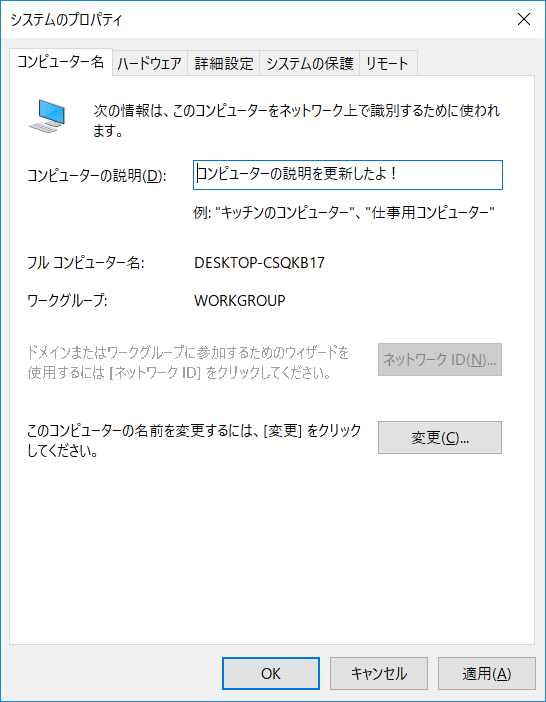
コンピューターの説明を自動設定出来ました。
~UI Automationで画面操作捕捉!その5 ~ UI Automation with PowerShell 奮戦記 11日目
UI Automation*1で遊ぼう!
UI Automation の画面操作の捕捉機能を使用した画面ハードコピーの自動化に挑戦しています。Windowsの標準実装のみ、PowerShellのみで動作させることを目指しています。
UI Automationでの画面操作の捕捉をPowerShellで出来るようにEventタイプを.Net Framworkで実装しました。
実装した開発ライブラリ、共通で使用するスクリプトについては以下を確認してくださいね。
https://amon52280sub.hateblo.jp/entry/2019/01/23/032420
画像保存機能を追加しました。
これで画面ハードコピーの自動化
まだ色々調整は必要ですが動きます。
PowerShell Version3(管理者権限)で実行してみる。
[CmdletBinding()]
Param (
  [string]$global:path = (".\Screen\{0}\{1}" -f (hostname),((Get-Date).ToString("yyyyMMdd"))),
  [string]$global:filename = "Screen",
  [int]$global:delay = 500
)

if (test-path $path) {
}
else {
  mkdir -Force $path
}

# UI Automation 共通ファンクションを組み込む
. .\UIA.ps1

# アセンブリを読み込む
Add-Type -AssemblyName System.Drawing

# スクリーンショット保存
function global:SaveScreenShot([int]$width,[int]$height,[int]$x,[int]$y)
{
  $filepath = ("{0}\{1}{2}.bmp" -f $path,$filename,(Get-Date).ToString("yyyyMMddhhmmss"))
  Write-Host $filepath

  #Bitmapオブジェクト
  $bmp = New-Object System.Drawing.Bitmap($width, $height)

  #BitmapオブジェクトからGraphicsオブジェクトを作成
  $g = [System.Drawing.Graphics]::FromImage($bmp)
  #スクリーンショットを取得
  $g.CopyFromScreen($x, $y, 0, 0, $bmp.Size)

  #画像ファイルを保存
  Write-Debug $PSCommandPath
  [System.IO.Directory]::SetCurrentDirectory((Split-Path $PSCommandPath))
  $bmp.Save($filepath)
}

# 初期化
$global:uia = UIA_Init

# Timer イベント捕捉
$global:timer = New-Object System.Timers.Timer
$timer.Interval = 100
$timer.Enabled = $false
Register-ObjectEvent -InputObject $timer -EventName Elapsed -Action {
  try {
  $name = $ev[0].current.name
  $controltype = $ev[0].current.localizedcontroltype
  $classname = $ev[0].current.classname
  $eventid = $ev[1].EventId.ProgrammaticName
  Write-Host $(UIA_OutPut -element $ev[0] -event $ev[1] -mode Event | Out-String)
  #Write-Host $(UIA_GetParentElement $ev[0] | fc | Out-String)

  # ウインドウ or ダイアログ
  $p = UIA_GetParentElement $ev[0]
  Write-Host $($p | Out-String)
  Write-Host ($p -ne $null)
  if ($p -ne $null) {
    # 枠幅計算 試行中
    $bw = (Get-ItemPropertyValue -Path 'HKCU:\Control Panel\Desktop\WindowMetrics' -Name BorderWidth) / 15
    $pbw = (Get-ItemPropertyValue -Path 'HKCU:\Control Panel\Desktop\WindowMetrics' -Name PaddedBorderWidth) / 15
    $dpi = (Get-ItemPropertyValue -Path 'HKCU:\Control Panel\Desktop\WindowMetrics' -Name AppliedDPI) * 0.01
    $dx = [math]::Round($dpi * $bw) + [math]::Round($dpi * $pbw)
    $width = $p.current.BoundingRectangle.width + ($dx * 2)
    $height = $p.current.BoundingRectangle.height + $dx
    $x = $p.current.BoundingRectangle.x - $dx
    $y = $p.current.BoundingRectangle.y
    SaveScreenShot $width $height $x $y
  }
  Write-Host $(UIA_OutPut -element $ev[0] -event $ev[1] -mode Event | Out-String)
  Write-Host $($ev[0].GetSupportedPatterns() | Out-String)
  $timer.Enabled = $false
  } catch {
    Write-Host $_
  }
} | Out-Null

# UI Automation イベント捕捉
Register-ObjectEvent -InputObject $uia -EventName UIChange -Action {
  try {
  #$timer.Enabled = $false

  if ($args -eq $null) {return}
  if ($args[0] -eq $null) {return}
  $global:ev = $args
  $name = $ev[0].current.name
  $controltype = $ev[0].current.localizedcontroltype
  $classname = $ev[0].current.classname
  $eventid = $ev[1].EventId.ProgrammaticName

  if ($name -match "powershell") {return}
  switch ($eventid) {
    "AutomationElementIdentifiers.AutomationFocusChangedEvent" {
      $timer.Enabled = $false
      $uia.SetEvent($ev[0])
      $timer.Interval = $delay
      $timer.Enabled = $true
    }
    "AutomationElementIdentifiers.AutomationPropertyChangedEvent" {
      $timer.Enabled = $false
      $timer.Interval = $delay
      $timer.Enabled = $true
    }
    "WindowPatternIdentifiers.WindowOpenedProperty"{
      Write-Host $(UIA_OutPut -element $ev[0] -event $ev[1] -mode Event | Out-String)
      $timer.Enabled = $false
      $timer.Interval = $delay
      $timer.Enabled = $true
    }
    ("WindowPatternIdentifiers.WindowClosedProperty"){
      #$timer.Interval = $delay
      #$timer.Enabled = $false
    }
    default {
      Write-Host $(UIA_OutPut -element $ev[0] -event $ev[1] -mode Event | Out-String)
      $timer.Interval = $delay
      $timer.Enabled = $false
    }
  }
  #Write-Host $(UIA_OutPut -element $ev[0] -event $ev[1] -mode Event | Out-String)
  } catch {
    Write-Host $_
  }
} | Out-Null

# イベントスタート
$uia.StartEvent()
"自動画面ハードコピースタート!!"
スクリプトだから修正、調整が楽ですねー。
後はちょこっと調整と画面ハードコピーの時、何か効果(音or絵)とか追加したいですね。
~UI Automationで画面情報取得!その2~ UI Automation with PowerShell 奮戦記 10日目
UI Automation*1で遊ぼう!
UI Automation の画面情報の取得機能を使用したWindows設定書生成の自動化に挑戦しています。Windowsの標準実装のみ、PowerShellのみで動作させることを目指しています。
UI Automationでの画面操作の捕捉をPowerShellで出来るようにEventタイプを.Net Framworkで実装しました。
実装した開発ライブラリ、共通で使用するスクリプトについては以下を確認してくださいね。
https://amon52280sub.hateblo.jp/entry/2019/01/23/032420
画面情報を取得してみましょう。
ツリー構造で親子関係を見やすくしました。
PowerShell Version3(管理者権限)で実行してみる。
[CmdletBinding()]
Param (
  [int]$global:delay = 500
)

# UI Automation 共通ファンクションを組み込む
. .\UIA.ps1

# 初期化
$global:uia = UIA_Init

# Timer イベント捕捉
$global:timer = New-Object System.Timers.Timer
$timer.Interval = 100
$timer.Enabled = $false
Register-ObjectEvent -InputObject $timer -EventName Elapsed -Action {
  try {
  $name = $ev[0].current.name
  $controltype = $ev[0].current.localizedcontroltype
  $classname = $ev[0].current.classname
  $eventid = $ev[1].EventId.ProgrammaticName

  # ウインドウ or ダイアログ
  $p = UIA_GetParentElement $ev[0]
  Write-Host $($p | Out-String)
  Write-Host ($p -ne $null)
  if ($p -ne $null) {
    # ツリー構造で表示
    Write-Host $(UIA_GetElementTreeWithNest $p | UIA_OutPut -mode ElementWithNest | Out-String)
  }
  Write-Host $(UIA_OutPut -element $ev[0] -event $ev[1] -mode Event | Out-String)
  Write-Host $($ev[0].GetSupportedPatterns() | Out-String)
  $timer.Enabled = $false
  } catch {
    Write-Host $_
  }
} | Out-Null

# UI Automation イベント捕捉
Register-ObjectEvent -InputObject $uia -EventName UIChange -Action {
  try {
  $timer.Enabled = $false

  $global:ev = $args
  $name = $ev[0].current.name
  $controltype = $ev[0].current.localizedcontroltype
  $classname = $ev[0].current.classname
  $eventid = $ev[1].EventId.ProgrammaticName

  if ($name -match "powershell") {return}
  switch ($eventid) {
    "AutomationElementIdentifiers.AutomationFocusChangedEvent" {
      $uia.SetEvent($ev[0])
      $timer.Interval = $delay
      $timer.Enabled = $true
    }
    "AutomationElementIdentifiers.AutomationPropertyChangedEvent" {
      $timer.Interval = $delay
      $timer.Enabled = $false
    }
    "WindowPatternIdentifiers.WindowOpenedProperty"{
      # ツリー構造で表示
      Write-Host $(UIA_GetElementTreeWithNest $ev[0] | UIA_OutPut -mode ElementWithNest | Out-String)
      Write-Host $(UIA_OutPut -element $ev[0] -event $ev[1] -mode Event | Out-String)
      $timer.Interval = $delay
      $timer.Enabled = $false
    }
    default {
      Write-Host $(UIA_OutPut -element $ev[0] -event $ev[1] -mode Event | Out-String)
      $timer.Interval = $delay
      $timer.Enabled = $false
    }
  }
  } catch {
    Write-Host $_
  }
} | Out-Null

# イベントスタート
$uia.StartEvent()
"画面情報取得スタート!!"
実行結果
UIA_GetElementTreeWithNest
UIA_GetElementTreeWithNest
UIA_GetElementTreeWithNest
UIA_GetElementTreeWithNest
UIA_GetElementTreeWithNest
UIA_GetElementTreeWithNest
UIA_GetElementTreeWithNest
UIA_GetElementTreeWithNest
UIA_GetElementTreeWithNest
UIA_GetElementTreeWithNest
UIA_GetElementTreeWithNest
UIA_GetElementTreeWithNest
UIA_GetElementTreeWithNest
UIA_GetElementTreeWithNest
UIA_GetElementTreeWithNest
UIA_GetElementTreeWithNest
UIA_GetElementTreeWithNest
UIA_GetElementTreeWithNest
UIA_GetElementTreeWithNest
UIA_GetElementTreeWithNest
UIA_GetElementTreeWithNest
UIA_GetElementTreeWithNest
UIA_GetElementTreeWithNest
UIA_GetElementTreeWithNest

ControlType  ClassName       Name
ダイアログ        #32770          システムのプロパティ
  ボタン        Button          OK
  ボタン        Button          キャンセル
  ボタン        Button          適用(A)
  タブ         SysTabControl32
    タブ項目                     コンピューター名
    タブ項目                     ハードウェア
    タブ項目                     詳細設定
      テキスト   Static          Administrator としてログオンしない場合は、これらのほとんどは変更できません。
      グループ   Button          パフォーマンス
      テキスト   Static          視覚効果、プロセッサのスケジュール、メモリ使用、および仮想メモリ
      ボタン    Button          設定(S)...
      グループ   Button          ユーザー プロファイル
      テキスト   Static          サインインに関連したデスクトップ設定
      ボタン    Button          設定(E)...
      グループ   Button          起動と回復
      テキスト   Static          システム起動、システム障害、およびデバッグ情報
      ボタン    Button          設定(T)
      ボタン    Button          環境変数(N)...
    タブ項目                     システムの保護
    タブ項目                     リモート
  タイトル バー                    システムのプロパティ
    メニュー バー                  システム メニュー バー
      メニュー項目                 システム
    ボタン                      閉じる


ControlType ClassName EventID                                       Name
ダイアログ       #32770    WindowPatternIdentifiers.WindowOpenedProperty システムのプロパティ


PS D:\開発\10DAY> UIA_GetParentElement

LocalizedControlType ClassName Name
タブ項目                           コンピューター名


UIA_GetParentElement

LocalizedControlType ClassName       Name
タブ                   SysTabControl32


UIA_GetParentElement

LocalizedControlType ClassName Name
ダイアログ                #32770    システムのプロパティ


Cached                                                                   Current
System.Windows.Automation.AutomationElement+AutomationElementInformation System.Windows.Automation.AutomationElement...


True
UIA_GetElementTreeWithNest
UIA_GetElementTreeWithNest
UIA_GetElementTreeWithNest
UIA_GetElementTreeWithNest
UIA_GetElementTreeWithNest
UIA_GetElementTreeWithNest
UIA_GetElementTreeWithNest
UIA_GetElementTreeWithNest
UIA_GetElementTreeWithNest
UIA_GetElementTreeWithNest
UIA_GetElementTreeWithNest
UIA_GetElementTreeWithNest
UIA_GetElementTreeWithNest
UIA_GetElementTreeWithNest
UIA_GetElementTreeWithNest
UIA_GetElementTreeWithNest
UIA_GetElementTreeWithNest
UIA_GetElementTreeWithNest
UIA_GetElementTreeWithNest
UIA_GetElementTreeWithNest
UIA_GetElementTreeWithNest
UIA_GetElementTreeWithNest
UIA_GetElementTreeWithNest
UIA_GetElementTreeWithNest
UIA_GetElementTreeWithNest
UIA_GetElementTreeWithNest
UIA_GetElementTreeWithNest
UIA_GetElementTreeWithNest

ControlType  ClassName       Name
ダイアログ        #32770          システムのプロパティ
  ボタン        Button          OK
  ボタン        Button          キャンセル
  ボタン        Button          適用(A)
  タブ         SysTabControl32
    タブ項目                     コンピューター名
      テキスト   Static          コンピューターの説明(D):
      編集     Edit            コンピューターの説明(D):
      テキスト   Static          例: "キッチンのコンピューター"、"仕事用コンピューター"
      テキスト   Static          フル コンピューター名:
      編集     Edit            フル コンピューター名:
      テキスト   Static          ワークグループ:
      編集     Edit            ワークグループ:
      テキスト   Static          ドメインまたはワークグループに参加するためのウィザードを使用するには [ネットワーク ID] をク
リックしてください。
      ボタン    Button          ネットワーク ID(N)...
      テキスト   Static          このコンピューターの名前を変更するには、[変更] をクリックしてください。

      ボタン    Button          変更(C)...
      テキスト   Static
      イメージ   Static
      テキスト   Static          次の情報は、このコンピューターをネットワーク上で識別するために使われます。

    タブ項目                     ハードウェア
    タブ項目                     詳細設定
    タブ項目                     システムの保護
    タブ項目                     リモート
  タイトル バー                    システムのプロパティ
    メニュー バー                  システム メニュー バー
      メニュー項目                 システム
    ボタン                      閉じる


ControlType ClassName EventID                                                  Name
編集          Edit      AutomationElementIdentifiers.AutomationFocusChangedEvent コンピューターの説明(D):


   Id ProgrammaticName
10002 ValuePatternIdentifiers.Pattern
10014 TextPatternIdentifiers.Pattern
共通ファンクション(UIA.ps1)のUIA_GetElementTreeWithNestで子エレメントを再帰呼び出しで検索してツリー構造を構築しています。
見やすくなりました。 設定書の構成がイメージ出来ますね。
